

[Jan 27, 2022] Ultimate AZ-500 Guide to Prepare Free Latest Microsoft Practice Tests Dumps
Get Top-Rated Microsoft AZ-500 Exam Dumps Now
Schedule exam
Languages: English, Japanese, Chinese (Simplified), Korean
Retirement date: none
This exam measures your ability to accomplish the following technical tasks: manage identity and access; implement platform protection; manage security operations; and secure data and applications.
NEW QUESTION 13
You have 20 Azure subscriptions and a security group named Group1. The subscriptions are children of the root management group.
Each subscription contains a resource group named RG1.
You need to ensure that for each subscription RG1 meets the following requirements:
* The members of Group1 are assigned the Owner role.
* The modification of permissions to RG1 is prevented.
What should you do? To answer, select the appropriate options in the answer area.
NOTE: Each correct selection is worth one point.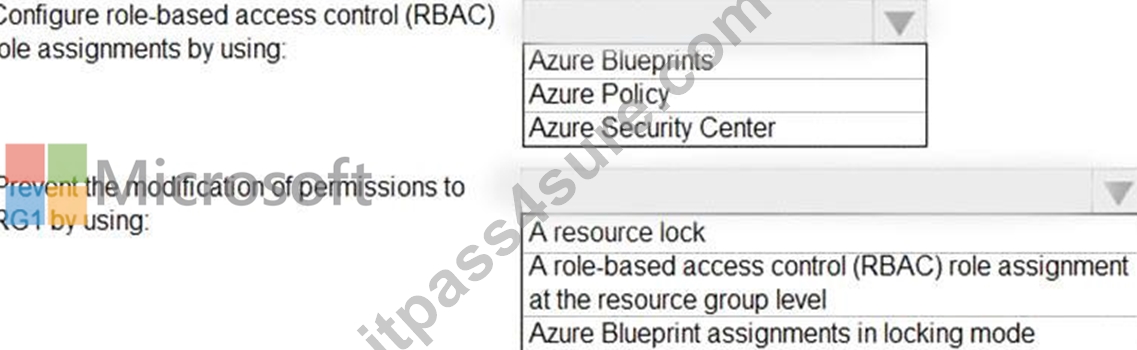
Answer:
Explanation: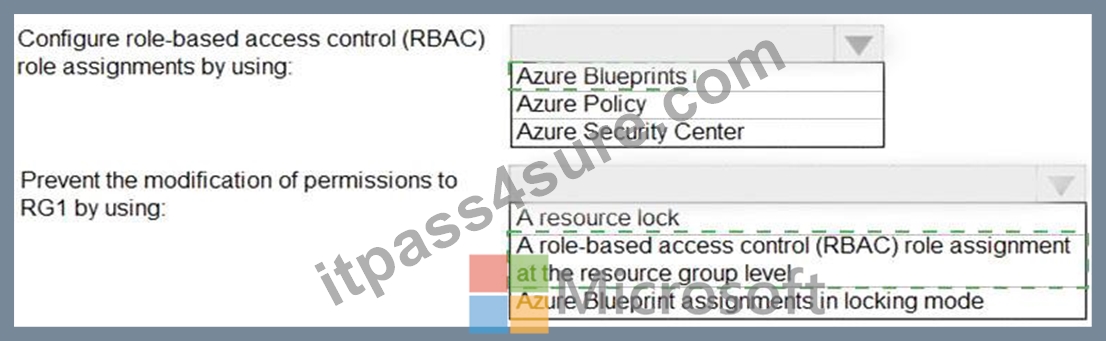
Explanation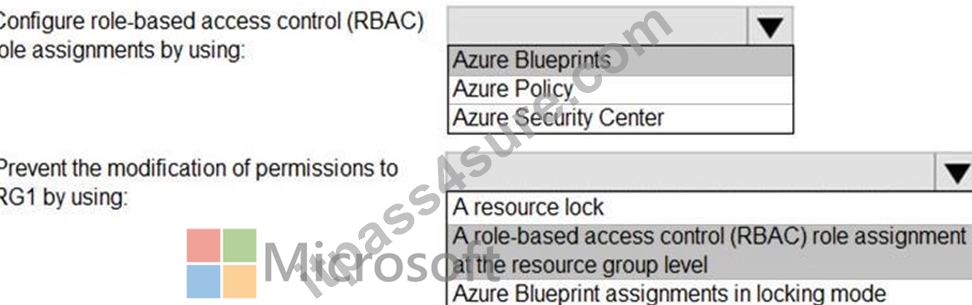
NEW QUESTION 14
You are troubleshooting a security issue for an Azure Storage account.
You enable the diagnostic logs for the storage account. What should you use to retrieve the diagnostics logs?
- A. File Explorer in Windows
- B. SQL query editor in Azure
- C. AzCopy
- D. the Security & Compliance admin center
Answer: C
Explanation:
Explanation
References:
https://docs.microsoft.com/en-us/azure/storage/common/storage-analytics-logging?toc=%2fazure%2fstorage%2
NEW QUESTION 15
SIMULATION
You need to enable Advanced Data Security for the SQLdb1 Azure SQL database. The solution must ensure that Azure Advanced Threat Protection (ATP) alerts are sent to [email protected].
To complete this task, sign in to the Azure portal and modify the Azure resources.
- A. * In the Azure portal, type SQL in the search box, select SQL databases from the search results then select SQLdb1. Alternatively, browse to SQL databases in the left navigation pane.
* In the properties of SQLdb1, scroll down to the Security section and select Advanced data security.
* Click on the Settings icon.
* Tick the Enable Advanced Data Security at the database level checkbox.
* Click Yes at the confirmation prompt.
* In the Storage account select a storage account if one isn't selected by default.
* Under Advanced Threat Protection Settings, enter [email protected] in the Send alerts to box.
* Click the Save button to save the changes. - B. * In the Azure portal, type SQL in the search box, select SQL databases from the search results then select SQLdb1. Alternatively, browse to SQL databases in the left navigation pane.
* In the properties of SQLdb1, scroll down to the Security section and select Advanced data security.
* Click on the Settings icon.
* Tick the Enable Advanced Data Security at the database level checkbox.
* In the Storage account select a storage account if one isn't selected by default.
* Under Advanced Threat Protection Settings, enter [email protected] in the Send alerts to box.
* Click the Save button to save the changes.
Answer: A
Explanation:
Reference:
https://docs.microsoft.com/en-us/azure/azure-sql/database/advanced-data-security
NEW QUESTION 16
You have two Azure virtual machines in the East US2 region as shown in the following table.
You deploy and configure an Azure Key vault.
You need to ensure that you can enable Azure Disk Encryption on VM1 and VM2.
What should you modify on each virtual machine? To answer, select the appropriate options in the answer area.
NOTE: Each correct selection is worth one point.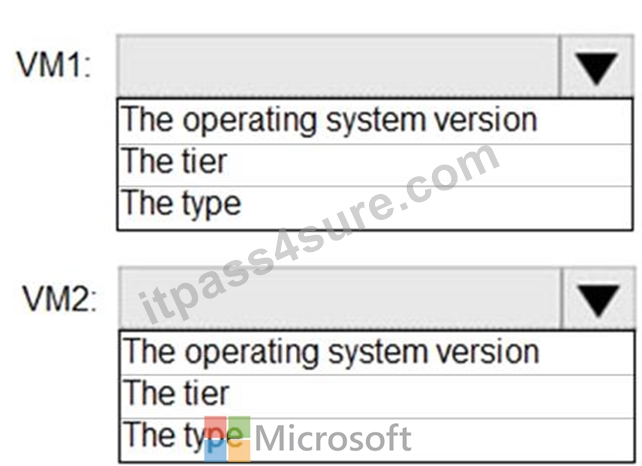
Answer:
Explanation: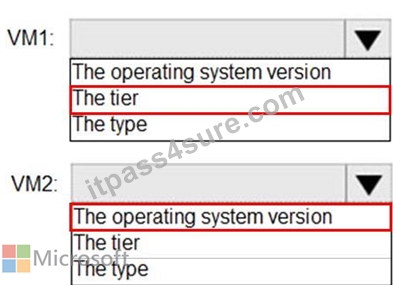
References:
https://docs.microsoft.com/en-us/azure/virtual-machines/windows/generation-2#generation-1-vs-generation-2-capabilities
NEW QUESTION 17
You have an Azure subscription that contains the virtual machines shown in the following table.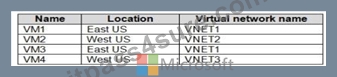
All the virtual networks are peered.
You deploy Azure Bastion to VNET2.
Which virtual machines can be protected by the bastion host?
- A. VM1, VM2, and VM3 only
- B. VM1, VM2, VM3, and VM4
- C. VM2 and VM4 only
- D. VM2 only
Answer: B
Explanation:
Explanation
https://docs.microsoft.com/en-us/azure/bastion/vnet-peering
NEW QUESTION 18
You have an Azure Active Directory (Azure AD) tenant that contains the users shown in the following table.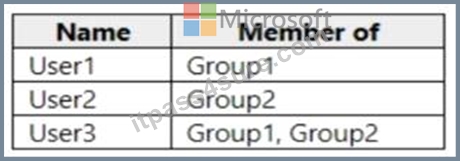
From Azure AD Privileged Identity Management (PIM), you configure the settings for the Security Administrator role as shown in the following exhibit.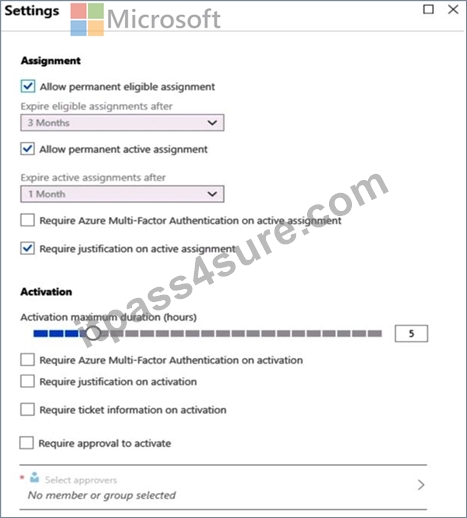
From PIM, you assign the Security Administrator role to the following groups:
* Group1: Active assignment type, permanently assigned
* Group2: Eligible assignment type, permanently eligible
For each of the following statements, select Yes if the statement is true. Otherwise, select No.
NOTE: Each correct selection is worth one point.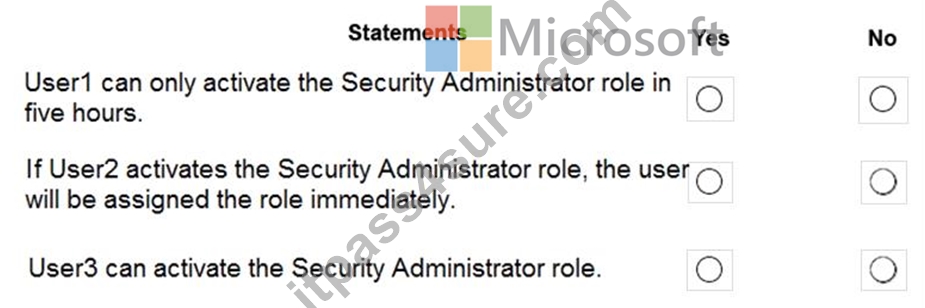
Answer:
Explanation: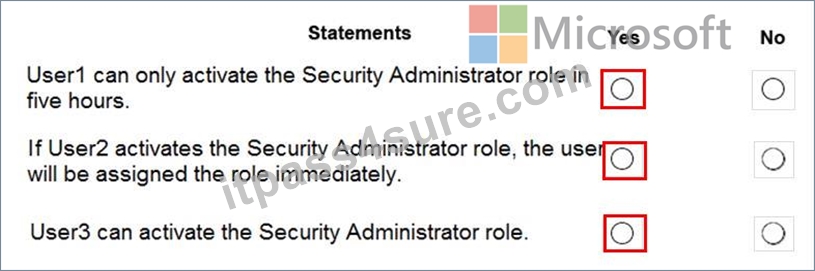
Explanation:
Box 1: Yes
Eligible Type: A role assignment that requires a user to perform one or more actions to use the role. If a user has been made eligible for a role, that means they can activate the role when they need to perform privileged tasks. There's no difference in the access given to someone with a permanent versus an eligible role assignment. The only difference is that some people don't need that access all the time.
You can choose from two assignment duration options for each assignment type (eligible and active) when you configure settings for a role. These options become the default maximum duration when a user is assigned to the role in Privileged Identity Management.
Use the Activation maximum duration slider to set the maximum time, in hours, that a role stays active before it expires. This value can be from one to 24 hours.
Box 2: Yes
Active Type: A role assignment that doesn't require a user to perform any action to use the role. Users assigned as active have the privileges assigned to the role Box 3: Yes User3 is member of Group2.
Reference:
https://docs.microsoft.com/en-us/azure/active-directory/privileged-identity-management/pim-configure
https://docs.microsoft.com/bs-cyrl-ba/azure/active-directory/privileged-identity-management/pim-resource-roles-configure-role-settings
NEW QUESTION 19
You have an Azure key vault named KeyVault1 that contains the items shown in the following table.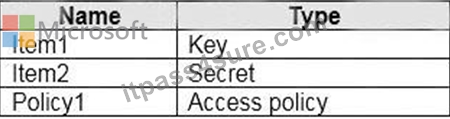
In KeyVault, the following events occur in sequence:
Item1 is deleted
Administrator enables soft delete
Item2 and Policy1 are deleted.
For each of the following statements, select Yes if the statement is true. Otherwise, select No.
NOTE: Each correct selection is worth one point.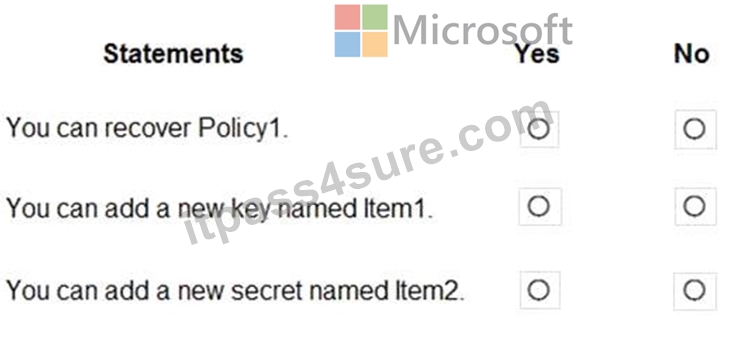
Answer:
Explanation: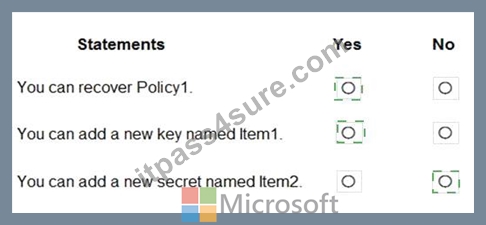
Explanation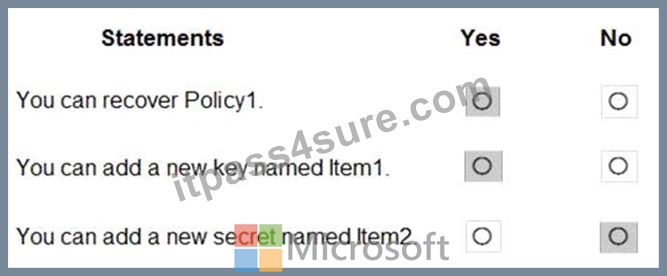
Reference:
https://docs.microsoft.com/en-us/azure/key-vault/general/soft-delete-overview
NEW QUESTION 20
You have an Azure Active Directory (Azure AD) tenant that contains two users named User1 and User2 and a registered app named App1.
You create an app-specific role named Role1.
You need to assign Role1 to User1 and enable User2 to request access to Appl.
Which two settings should you modify? To answer select the appropriate settings in the answer area NOTE: Each correct selection is worth one pant.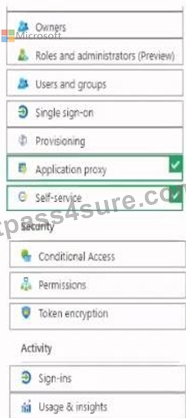
Answer:
Explanation:
Explanation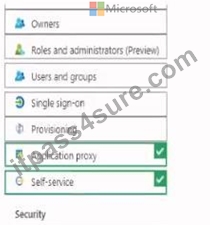
NEW QUESTION 21
You have an Azure subscription named Sub1 that contains an Azure Storage account named Contosostorage1 and an Azure key vault named Contosokeyvault1.
You plan to create an Azure Automation runbook that will rotate the keys of Contosostorage1 and store them in Contosokeyvault1.
You need to implement prerequisites to ensure that you can implement the runbook.
Which three actions should you perform in sequence? To answer, move the appropriate actions from the list of actions to the answer area and arrange them in the correct order.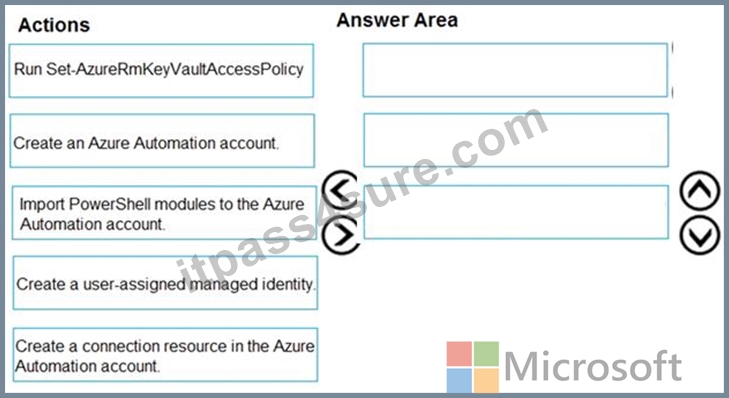
Answer:
Explanation: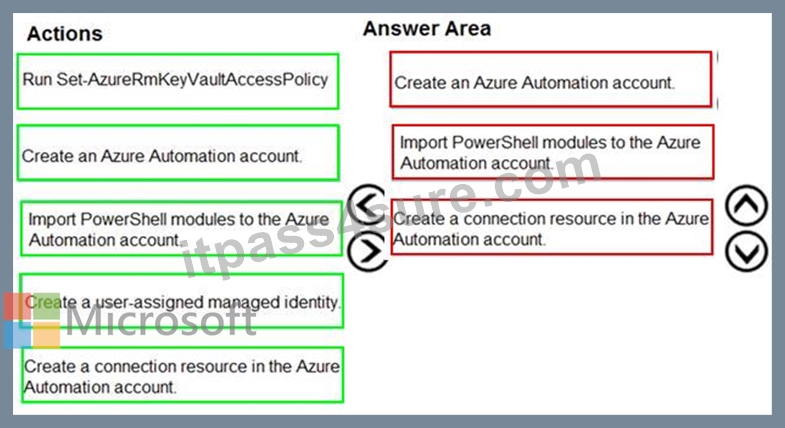
Explanation:
Step 1: Create an Azure Automation account
Runbooks live within the Azure Automation account and can execute PowerShell scripts.
Step 2: Import PowerShell modules to the Azure Automation account
Under 'Assets' from the Azure Automation account Resources section select 'to add in Modules to the runbook. To execute key vault cmdlets in the runbook, we need to add AzureRM.profile and AzureRM.key vault.
Step 3: Create a connection resource in the Azure Automation account
You can use the sample code below, taken from the AzureAutomationTutorialScript example runbook, to authenticate using the Run As account to manage Resource Manager resources with your runbooks. The AzureRunAsConnection is a connection asset automatically created when we created 'run as accounts' above. This can be found under Assets -> Connections. After the authentication code, run the same code above to get all the keys from the vault.
$connectionName = "AzureRunAsConnection"
try
{
# Get the connection "AzureRunAsConnection "
$servicePrincipalConnection=Get-AutomationConnection -Name $connectionName
"Logging in to Azure..."
Add-AzureRmAccount `
-ServicePrincipal `
-TenantId $servicePrincipalConnection.TenantId `
-ApplicationId $servicePrincipalConnection.ApplicationId `
-CertificateThumbprint $servicePrincipalConnection.CertificateThumbprint
}
References:
https://www.rahulpnath.com/blog/accessing-azure-key-vault-from-azure-runbook/
NEW QUESTION 22
You have an Azure Active Directory (Azure AD) tenant named contoso.com that contains the users shown in the following table.
You create and enforce an Azure AD Identity Protection user risk policy that has the following settings:
* Assignment: Include Group1, Exclude Group2
* Conditions: Sign-in risk of Medium and above
* Access: Allow access, Require password change
For each of the following statements, select Yes if the statement is true. Otherwise, select No.
NOTE: Each correct selection is worth one point.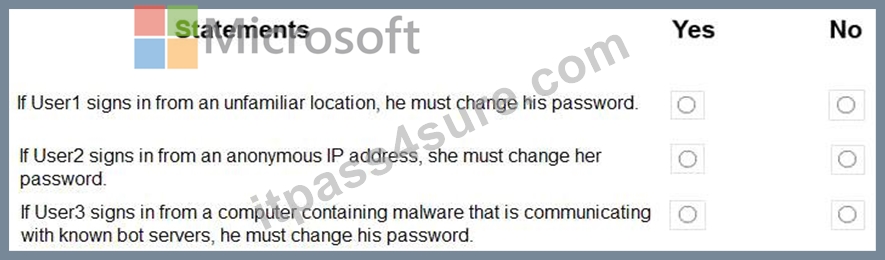
Answer:
Explanation: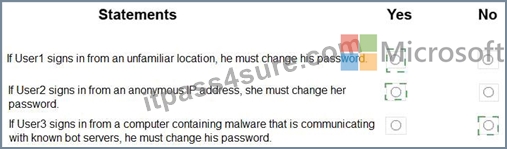
Explanation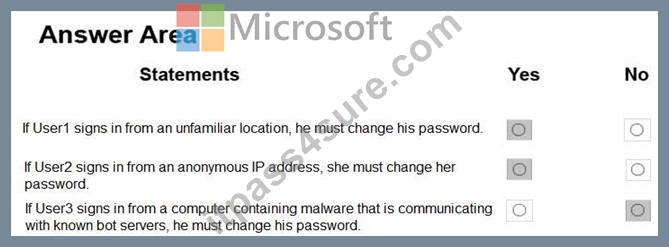
Box 1: Yes
User1 is member of Group1. Sign in from unfamiliar location is risk level Medium.
Box 2: Yes
User2 is member of Group1. Sign in from anonymous IP address is risk level Medium.
Box 3: No
Sign-ins from IP addresses with suspicious activity is low.
Note: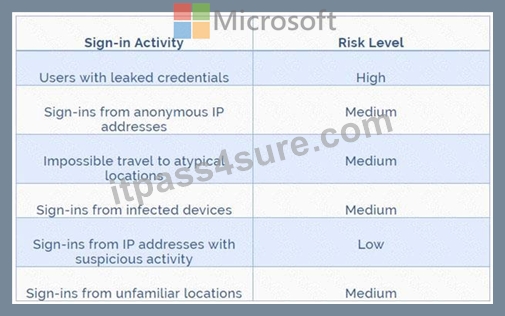
Azure AD Identity protection can detect six types of suspicious sign-in activities:
* Users with leaked credentials
* Sign-ins from anonymous IP addresses
* Impossible travel to atypical locations
* Sign-ins from infected devices
* Sign-ins from IP addresses with suspicious activity
* Sign-ins from unfamiliar locations
These six types of events are categorized in to 3 levels of risks - High, Medium & Low:
References:
http://www.rebeladmin.com/2018/09/step-step-guide-configure-risk-based-azure-conditional-access-policies/
NEW QUESTION 23
You need to ensure that connections through an Azure Application Gateway named Homepage-AGW are inspected for malicious requests.
To complete this task, sign in to the Azure portal.
You do not need to wait for the task to complete.
Answer:
Explanation:
See the explanation below.
You need to enable the Web Application Firewall on the Application Gateway.
In the Azure portal, type Application gateways in the search box, select Application gateways from the search results then select the gateway named Homepage-AGW. Alternatively, browse to Application Gateways in the left navigation pane.
In the properties of the application gateway, click on
For the Tier setting, select WAF V2.
In the Firewall status section, click the slider to switch to
In the Firewall mode section, click the slider to switch to
Click Save to save the changes.
NEW QUESTION 24
Use the following login credentials as needed:
To enter your username, place your cursor in the Sign in box and click on the username below.
To enter your password, place your cursor in the Enter password box and click on the password below.
Azure Username: [email protected]
Azure Password: Ag1Bh9!#Bd
The following information is for technical support purposes only:
Lab Instance: 10598168
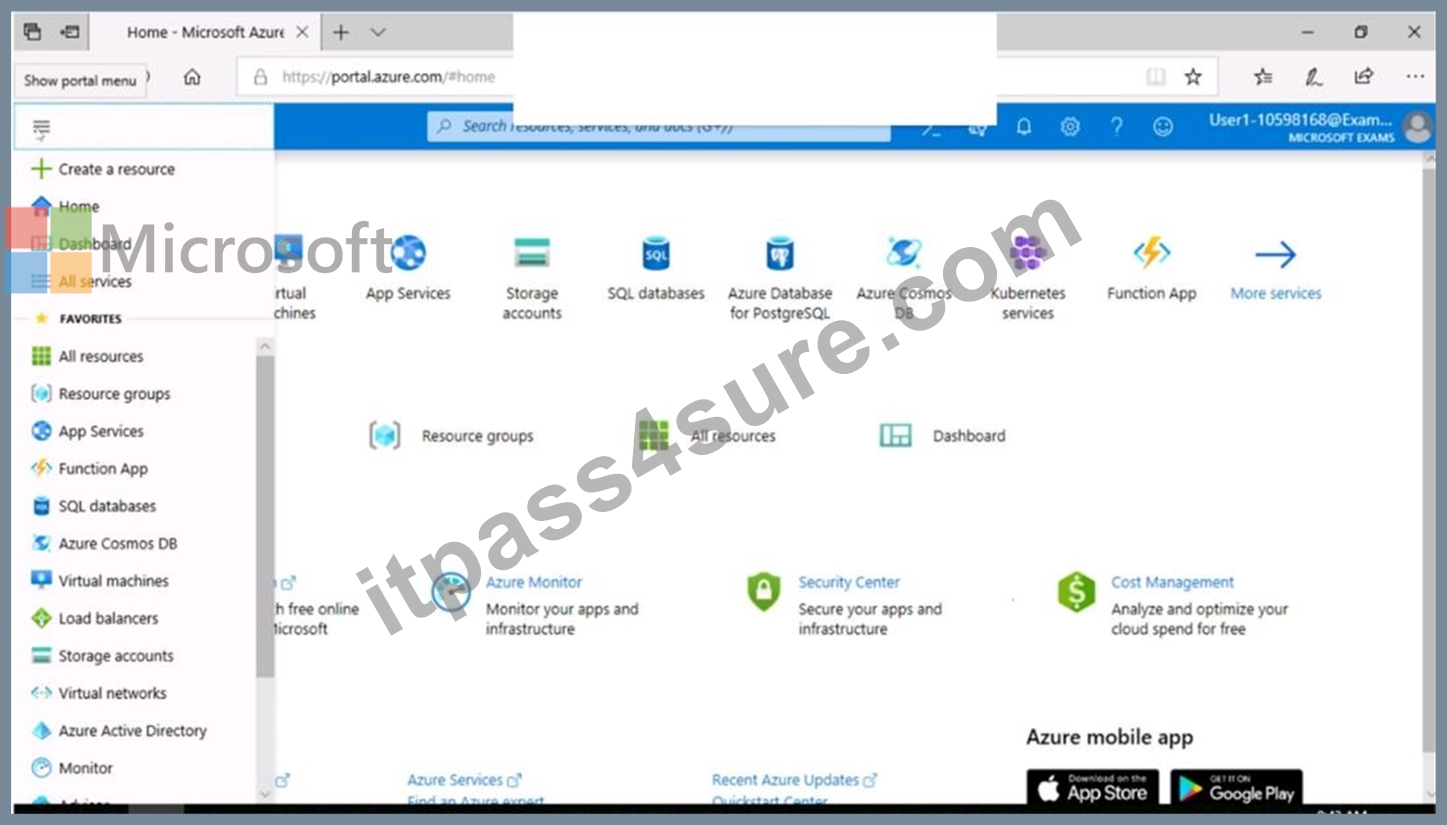
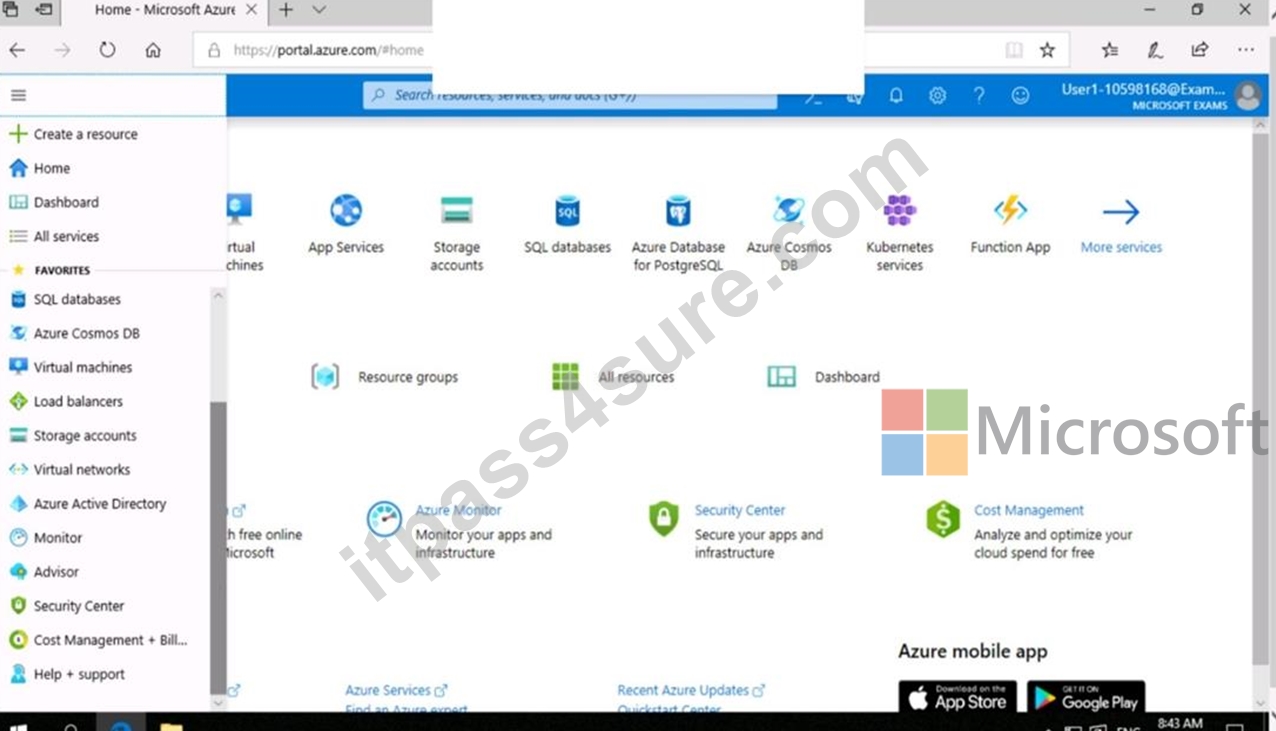
You need to configure Azure to allow RDP connections from the Internet to a virtual machine named VM1.
The solution must minimize the attack surface of VM1.
To complete this task, sign in to the Azure portal.
Answer:
Explanation:
See the explanation below.
Explanation
To enable the RDP port in an NSG, follow these steps:
* Sign in to the Azure portal.
* In Virtual Machines, select VM1
* In Settings, select Networking.
* In Inbound port rules, check whether the port for RDP is set correctly. The following is an example of the configuration:
Priority: 300
Name: Port_3389
Port(Destination): 3389
Protocol: TCP
Source: Any
Destinations: Any
Action: Allow
Reference:
https://docs.microsoft.com/en-us/azure/virtual-machines/troubleshooting/troubleshoot-rdp-nsg-problem
NEW QUESTION 25
You have an Azure subscription named Sub1 that contains an Azure Storage account named Contosostorage1 and an Azure key vault named Contosokeyvault1.
You plan to create an Azure Automation runbook that will rotate the keys of Contosostorage1 and store them in Contosokeyvault1.
You need to implement prerequisites to ensure that you can implement the runbook.
Which three actions should you perform in sequence? To answer, move the appropriate actions from the list of actions to the answer area and arrange them in the correct order.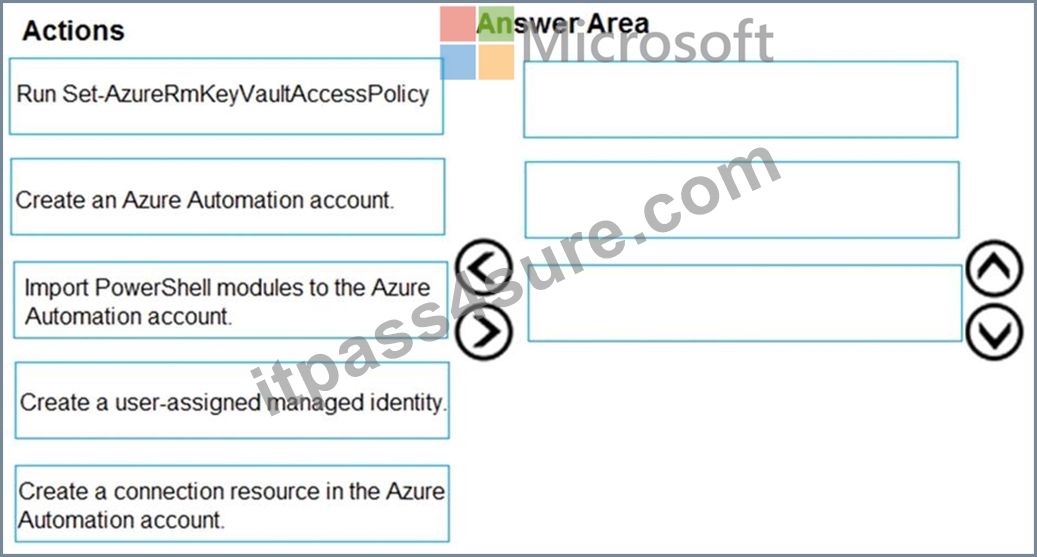
Answer:
Explanation: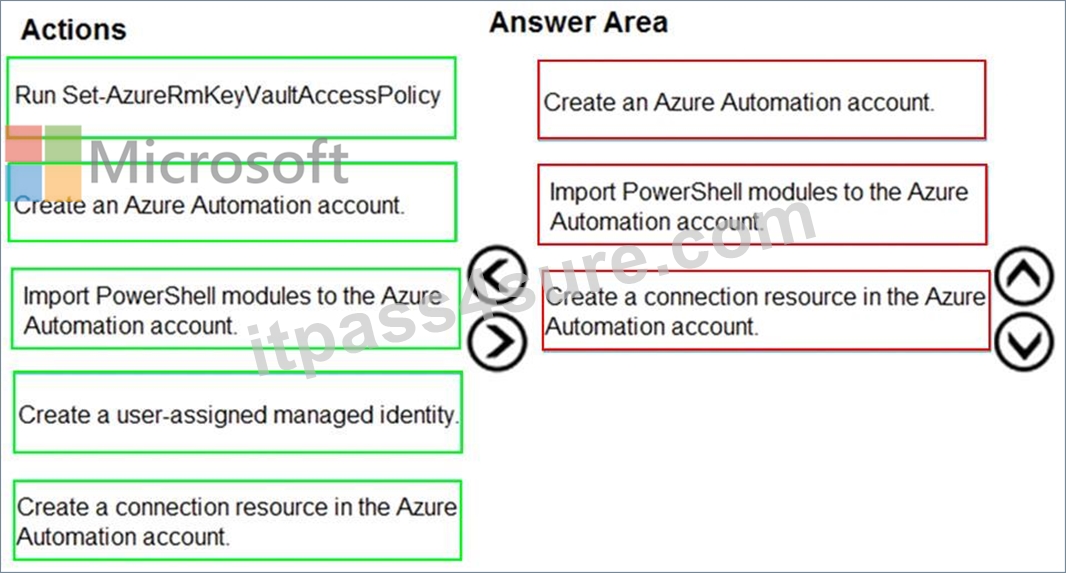
Explanation:
Step 1: Create an Azure Automation account
Runbooks live within the Azure Automation account and can execute PowerShell scripts.
Step 2: Import PowerShell modules to the Azure Automation account
Under 'Assets' from the Azure Automation account Resources section select 'to add in Modules to the runbook. To execute key vault cmdlets in the runbook, we need to add AzureRM.profile and AzureRM.key vault.
Step 3: Create a connection resource in the Azure Automation account
You can use the sample code below, taken from the AzureAutomationTutorialScript example runbook, to authenticate using the Run As account to manage Resource Manager resources with your runbooks. The AzureRunAsConnection is a connection asset automatically created when we created 'run as accounts' above. This can be found under Assets -> Connections. After the authentication code, run the same code above to get all the keys from the vault.
$connectionName = "AzureRunAsConnection"
try
{
# Get the connection "AzureRunAsConnection "
$servicePrincipalConnection=Get-AutomationConnection -Name $connectionName
"Logging in to Azure..."
Add-AzureRmAccount `
-ServicePrincipal `
-TenantId $servicePrincipalConnection.TenantId `
-ApplicationId $servicePrincipalConnection.ApplicationId `
-CertificateThumbprint $servicePrincipalConnection.CertificateThumbprint
}
References:
https://www.rahulpnath.com/blog/accessing-azure-key-vault-from-azure-runbook/
NEW QUESTION 26
You work at a company named Contoso, Ltd. that has the offices shown in the following table.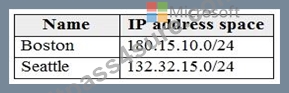
Contoso has an Azure Active Directory (Azure AD) tenant named contoso.com. All contoso.com users have Azure Multi-Factor Authentication (MFA) enabled. The tenant contains the users shown in the following table.
The multi-factor settings for contoso.com are configured as shown in the following exhibit.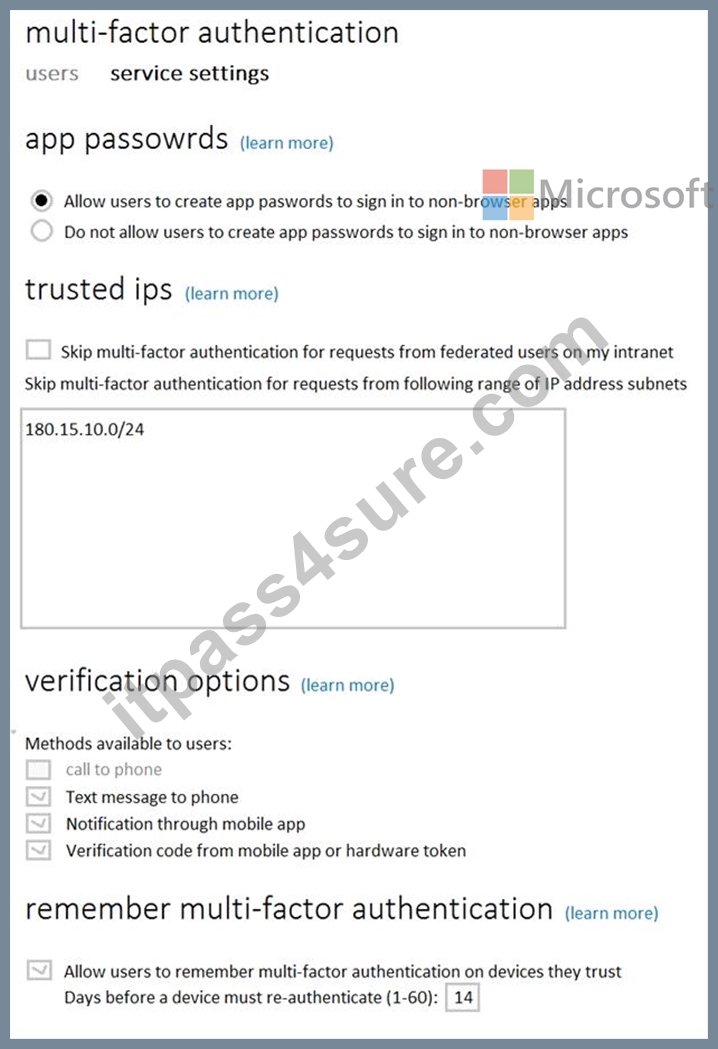
For each of the following statements, select Yes if the statement is true. Otherwise, select No.
NOTE: Each correct selection is worth one point.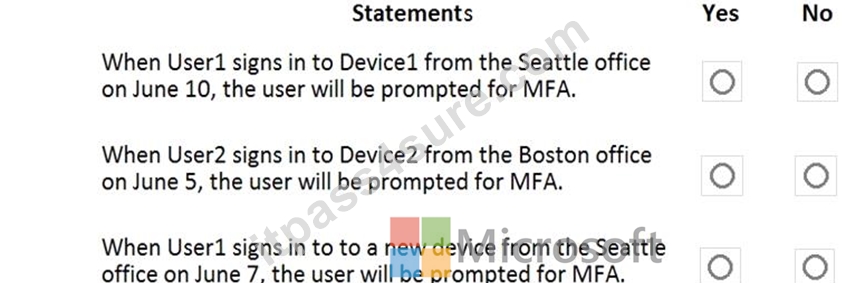
Answer:
Explanation: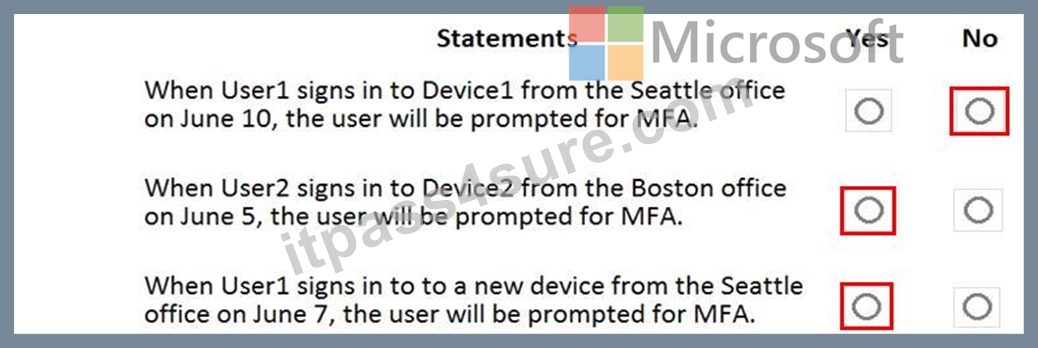
NEW QUESTION 27
You are evaluating the effect of the application security groups on the network communication between the virtual machines in Sub2.
For each of the following statements, select Yes if the statement is true. Otherwise, select No.
NOTE: Each correct selection is worth one point.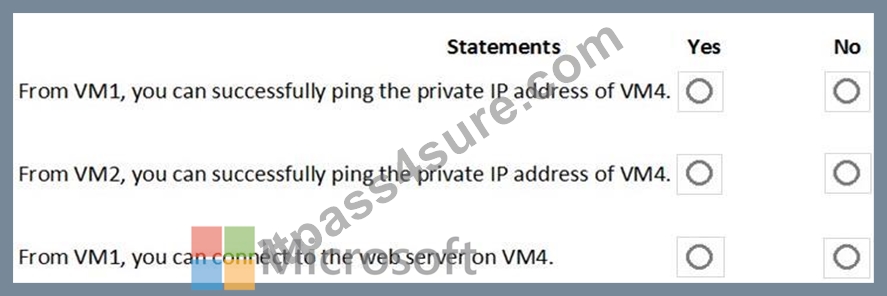
Answer:
Explanation:
Explanation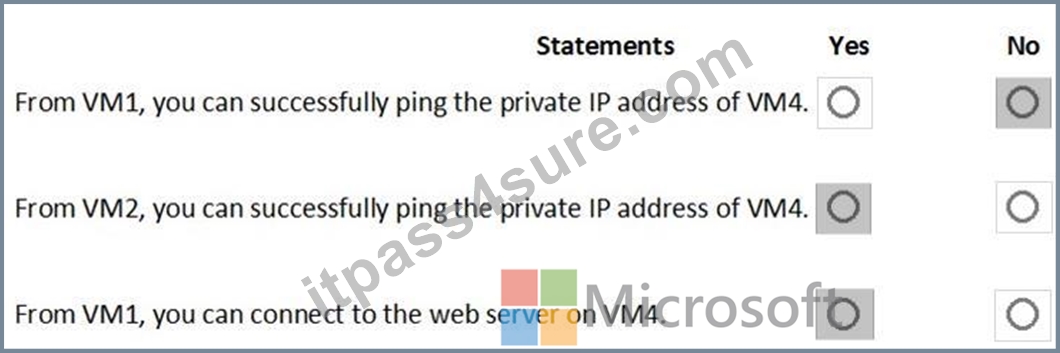
Box 1: No. VM4 is in Subnet13 which has NSG3 attached to it.
VM1 is in ASG1. NSG3 would only allow ICMP pings from ASG2 but not ASG1. Only TCP traffic is allowed from ASG1.
NSG3 has the inbound security rules shown in the following table.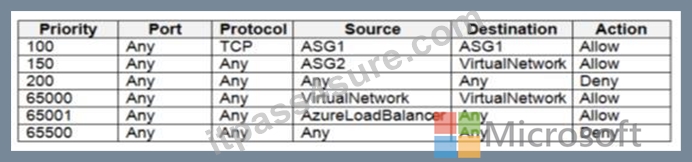
Box 2: Yes.
VM2 is in ASG2. Any protocol is allowed from ASG2 so ICMP ping would be allowed.
Box3. VM1 is in ASG1. TCP traffic is allowed from ASG1 so VM1 could connect to the web server as connections to the web server would be on ports TCP 80 or TCP 443.
NEW QUESTION 28
You need to meet the identity and access requirements for Group1.
What should you do?
- A. Modify the membership rule of Group1.
- B. Change the membership type of Group1 to Assigned. Create two groups that have dynamic memberships. Add the new groups to Group1.
- C. Add a membership rule to Group1.
- D. Delete Group1. Create a new group named Group1 that has a membership type of Office 365. Add users and devices to the group.
Answer: B
Explanation:
https://docs.microsoft.com/en-us/azure/active-directory/users-groups-roles/groups-dynamic-membership Explanation:
Scenario:
Litware identifies the following identity and access requirements: All San Francisco users and their devices must be members of Group1.
The tenant currently contain this group:
References:
https://docs.microsoft.com/en-us/azure/active-directory/users-groups-roles/groups-dynamic-membership
https://docs.microsoft.com/en-us/azure/active-directory/fundamentals/active-directory-groups-create-azure-portal
Topic 1, Litware, inc
Existing Environment
Litware has an Azure subscription named Sub1 that has a subscription ID of 43894a43-17c2-4a39-8cfc-3540c2653ef4.
Sub1 is associated to an Azure Active Directory (Azure AD) tenant named litwareinc.com. The tenant contains the user objects and the device objects of all the Litware employees and their devices. Each user is assigned an Azure AD Premium P2 license. Azure AD Privileged Identity Management (PIM) is activated.
The tenant contains the groups shown in the following table.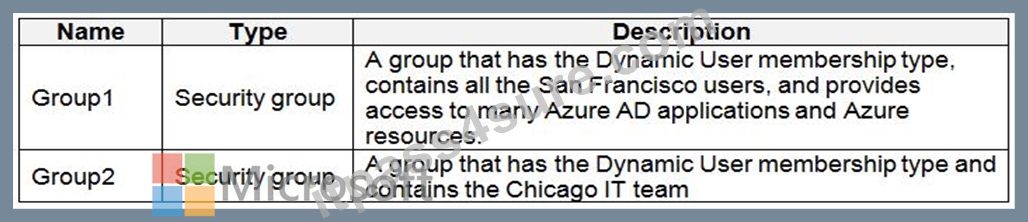
The Azure subscription contains the objects shown in the following table.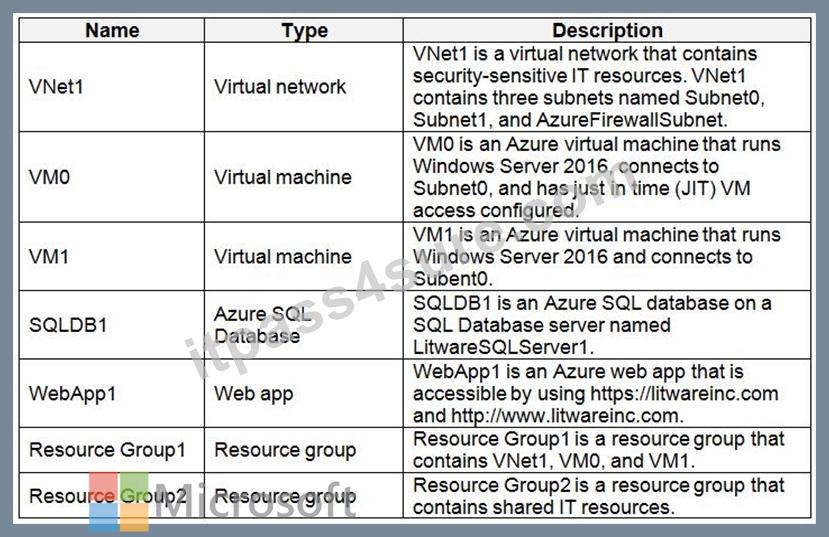
Azure Security Center is set to the Free tier.
Planned changes
Litware plans to deploy the Azure resources shown in the following table.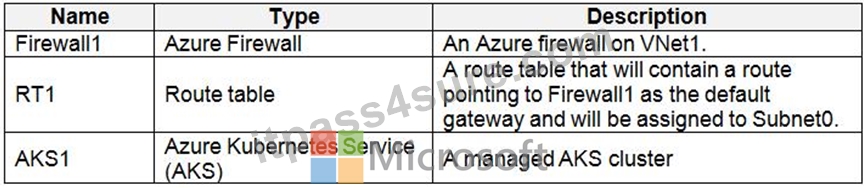
Litware identifies the following identity and access requirements:
All San Francisco users and their devices must be members of Group1.
The members of Group2 must be assigned the Contributor role to Resource Group2 by using a permanent eligible assignment.
Users must be prevented from registering applications in Azure AD and from consenting to applications that access company information on the users' behalf.
Platform Protection Requirements
Litware identifies the following platform protection requirements:
Microsoft Antimalware must be installed on the virtual machines in Resource Group1.
The members of Group2 must be assigned the Azure Kubernetes Service Cluster Admin Role.
Azure AD users must be to authenticate to AKS1 by using their Azure AD credentials.
Following the implementation of the planned changes, the IT team must be able to connect to VM0 by using JIT VM access.
A new custom RBAC role named Role1 must be used to delegate the administration of the managed disks in Resource Group1. Role1 must be available only for Resource Group1.
Security Operations Requirements
Litware must be able to customize the operating system security configurations in Azure Security Center.
NEW QUESTION 29
You have an Azure subscription named Sub1 that is associated to an Azure Active Directory (Azure AD) tenant named contoso.com.
An administrator named Admin1 has access to the following identities:
* An OpenID-enabled user account
* A Hotmail account
* An account in contoso.com
* An account in an Azure AD tenant named fabrikam.com
You plan to use Azure Account Center to transfer the ownership of Sub1 to Admin1.
To which accounts can you transfer the ownership of Sub1?
- A. contoso.com, fabrikam.com, Hotmail, and OpenID-enabled user account
- B. contoso.com only
- C. contoso.com and fabrikam.com only
- D. contoso.com, fabrikam.com, and Hotmail only
Answer: C
Explanation:
When you transfer billing ownership of your subscription to an account in another Azure AD tenant, you can move the subscription to the new account's tenant. If you do so, all users, groups, or service principals who had role based access (RBAC) to manage subscriptions and its resources lose their access. Only the user in the new account who accepts your transfer request will have access to manage the resources.
Reference:
https://docs.microsoft.com/en-us/azure/billing/billing-subscription-transfer
https://docs.microsoft.com/en-us/azure/billing/billing-subscription-transfer#transferring-subscription-to-anaccount-in-another-azure-ad-tenant
NEW QUESTION 30
You have an Azure subscription that contains the resources shown in the following table.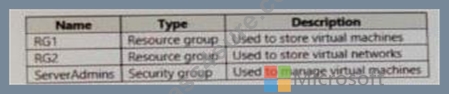
You need to ensure that ServerAdmins can perform the following tasks:
Create virtual machine to the existing virtual network in RG2 only.
The solution must use the principle of least privilege.
Which two role-based access control (RBAC) roles should you assign to ServerAdmins? Each correct answer presents part of the solution.
NOTE: Each correct selection is worth one point.
- A. A custom RBAC role for the subscription
- B. the Virtual Machine Contributor role for RG1.
- C. the Contributor role for the subscription
- D. a custom RBAC role for RG2
- E. the Network Contributor role for RG2
- F. the Network Contributor role for RG1.
Answer: B,E
NEW QUESTION 31
......
Certification Path
The Microsoft Azure Security Technologies Certification includes only one AZ-500 Exam.
Passing Key To Getting AZ-500 Certified Exam Engine PDF: https://www.itpass4sure.com/AZ-500-practice-exam.html
AZ-500 Exam Dumps Pass with Updated Tests Dumps: https://drive.google.com/open?id=1WPySBN0zzyAQD8Oy1wbrk745P3odDTW9
