

Full Associate-Android-Developer Practice Test and 125 unique questions with explanations waiting just for you!
Google Developers Dumps Associate-Android-Developer Exam for Full Questions - Exam Study Guide
NEW QUESTION 58
Select correct demonstration of WorkRequest cancellation.
- A. val request: WorkRequest = OneTimeWorkRequest.Builder (FooWorker::class.java).build() workManager.enqueue(request) val status = workManager.getWorkInfoByIdLiveData(request.id) status.observe(...)
- B. workManager.enqueue(OneTimeWorkRequest.Builder(FooWorker::class.java).build())
- C. val request1: WorkRequest = OneTimeWorkRequest.Builder (FooWorker::class.java).build() val request2: WorkRequest = OneTimeWorkRequest.Builder (BarWorker::class.java).build() val request3: WorkRequest = OneTimeWorkRequest.Builder (BazWorker::class.java).build() workManager.beginWith(request1, request2).then(request3).enqueue()
- D. val request: WorkRequest = OneTimeWorkRequest.Builder (FooWorker::class.java).build() workManager.enqueue(request) workManager.cancelWorkById(request.id)
- E. val request: WorkRequest = OneTimeWorkRequest.Builder (FooWorker::class.java).build() workManager.enqueue(request) workManager.cancelWork(request)
Answer: D
Explanation:
Working with WorkManager, from the 2018 Android Dev Summit WorkManager: Beyond the basics, from the 2019 Android Dev Summit Reference:
https://developer.android.com/reference/androidx/work/WorkManager?hl=en
NEW QUESTION 59
By default, the notification's text content is truncated to fit one line. If you want your notification to be longer, for example, to create a larger text area, you can do it in this way:
- A. var builder = NotificationCompat.Builder(this, CHANNEL_ID)
.setContentText("Much longer text that cannot fit one line...")
.setStyle(NotificationCompat.BigTextStyle()
.bigText("Much longer text that cannot fit one line..."))
... - B. var builder = NotificationCompat.Builder(this, CHANNEL_ID)
.setContentText("Much longer text that cannot fit one line...")
.setTheme(android.R.style.Theme_LongText);
... - C. var builder = NotificationCompat.Builder(this, CHANNEL_ID)
.setContentText("Much longer text that cannot fit one line...")
.setLongText("Much longer text that cannot fit one line..."))
...
Answer: A
Explanation:
Reference:
https://developer.android.com/training/notify-user/build-notification
NEW QUESTION 60
If no any folder like res/anim-<qualifiers>, res/drawable-<qualifiers>, res/layout-<qualifiers>, res/raw-
<qualifiers>, res/xml-<qualifiers> exist in the project. Which folders are required in the project anyway? (Choose two.)
- A. res/xml/
- B. res/raw/
- C. res/layout/
- D. res/anim/
- E. res/drawable/
Answer: C,E
Explanation:
Reference:
https://developer.android.com/guide/topics/resources/localization
NEW QUESTION 61
What statements about InputStreamReader (java.io.InputStreamReader) are correct? (Choose two.)
- A. An InputStreamReader is a bridge from byte streams to character streams: It reads bytes and decodes them into characters using a specified charset. The charset that it uses may be specified by name or may be given explicitly, or the platform's default charset may be accepted.
- B. No any invocation of one of an InputStreamReader's read() methods can cause some bytes to be read from the underlying byte-input stream.
- C. Each invocation of one of an InputStreamReader's read() methods may cause one or more bytes to be read from the underlying byte-input stream. To enable the efficient conversion of bytes to characters, more bytes may be read ahead from the underlying stream than are necessary to satisfy the current read operation.
- D. An InputStreamReader is a bridge from character streams to byte streams: It reads characters using a specified charset and encodes them into bytes. The charset that it uses may be specified by name or may be given explicitly, or the platform's default charset may be accepted.
Answer: A,C
NEW QUESTION 62
Assume that an app includes a default set of graphics and two other sets of graphics, each optimized for a different device setup:
res/drawable/
Contains default graphics. res/drawable-small-land-stylus/
Contains graphics optimized for use with a device that expects input from a stylus and has a QVGA low- density screen in landscape orientation.
res/drawable-ja/
Contains graphics optimized for use with Japanese.
What happens if the app runs on a device that is configured to use Japanese and, at the same time, the device happens to be one that expects input from a stylus and has a QVGA low-density screen in landscape orientation?
- A. Android loads graphics from res/drawable-ja/
- B. Android loads graphics from res/drawable-small-land-stylus/
- C. Android loads graphics from res/drawable/
Answer: A
Explanation:
Reference:
https://developer.android.com/guide/topics/resources/localization
NEW QUESTION 63
Custom views and directional controller clicks. In general, you should send an AccessibilityEvent whenever the content of your custom view changes. For example, if a text value was changed in your custom view, you should emit an event of this type:
- A. TYPE_WINDOWS_CHANGED
- B. TYPE_VIEW_TEXT_CHANGED
- C. TYPE_WINDOWS_CHANGED
- D. TYPE_VIEW_CONTEXT_CLICKED
Answer: B
Explanation:
Reference:
https://developer.android.com/guide/topics/ui/accessibility/custom-views
NEW QUESTION 64
With recommended app architecture. Fill the following diagram, which shows how all the modules usually should interact with one another after designing the app (drag modules to correct places).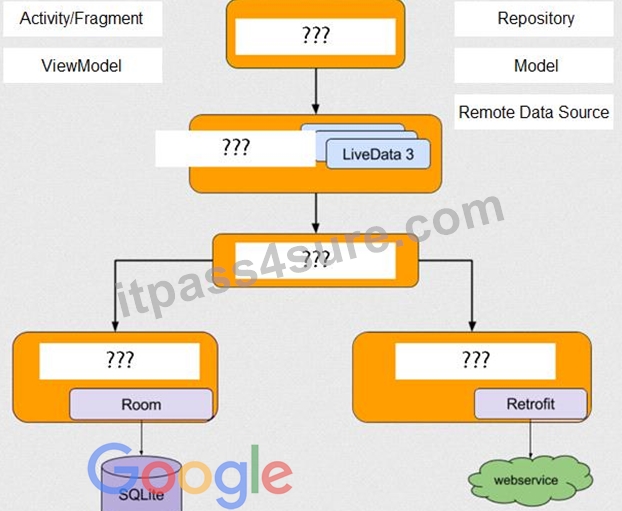
Answer:
Explanation:
NEW QUESTION 65
Filter logcat messages. If in the filter menu, a filter option "Edit Filter Configuration"? means:
- A. Create or modify a custom filter. For example, you could create a filter to view log messages from two apps at the same time.
- B. Apply no filters. Logcat displays all log messages from the device, regardless of which process you selected.
- C. Display the messages produced by the app code only (the default). Logcat filters the log messages using the PID of the active app.
Answer: A
NEW QUESTION 66
Android uses adapters (from the Adapter class) to connect data with View items in a list. There are many different kinds of adapters available, and you can also write custom adapters. To connect data with View items, the adapter needs to know about the View items. From what is extended the entity that is usually used in an adapter and describes a View item and its position within the RecyclerView?
- A. RecyclerViewAccessibilityDelegate
- B. RecyclerView.ItemDecoration
- C. RecyclerView.AdapterDataObserver
- D. RecyclerView.ViewHolder
Answer: D
Explanation:
Reference:
https://developer.android.com/guide/topics/ui/layout/recyclerview
NEW QUESTION 67
By executing an allowMainThreadQueries() method to the room database builder RoomDatabase.Builder, we can:
- A. handle database first time creation
- B. set the database factory
- C. disable the main thread query check for Room
- D. handle database opening
Answer: C
NEW QUESTION 68
Android Tests. You can use the childSelector() method to nest multiple UiSelector instances. For example, the following code example shows how your test might specify a search to find the first ListView in the currently displayed UI, then search within that ListView to find a UI element with the text property Apps.
What is the correct sample?
- A. val appItem: UiObject = device.findObject( UiSelector().className("android.widget.ListView")
.instance(
UiSelector().text("Apps")
)
) - B. val appItem: UiObject = device.findObject( UiSelector().className(ListView.class)
.instance(1)
.childSelector(
UiSelector().text("Apps")
)
) - C. val appItem: UiObject = device.findObject( UiSelector().className("android.widget.ListView")
.instance(0)
.childSelector(
UiSelector().text("Apps")
)
)
Answer: C
NEW QUESTION 69
In a common Paging Library architecture scheme, move instances to the correct positions.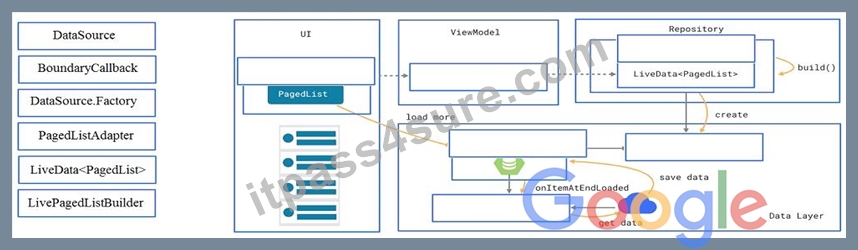
Answer:
Explanation: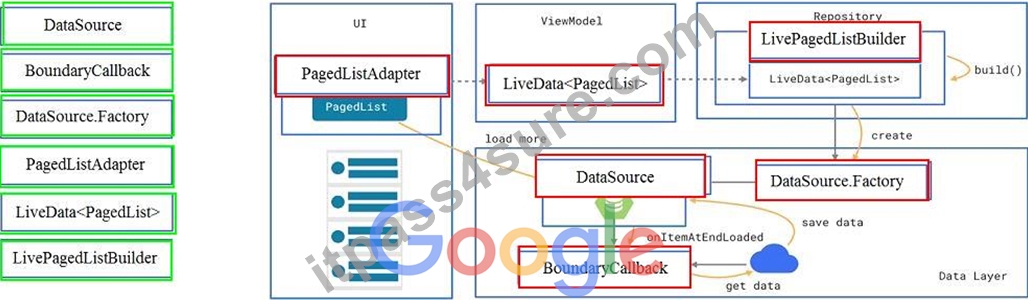
Reference:
https://developer.android.com/topic/libraries/architecture/paging/ui
NEW QUESTION 70
What is demonstrated by the code below?
// RawDao.java
@Dao
interface RawDao {
@RawQuery
User getUserViaQuery(SupportSQLiteQuery query);
}
// Usage of RawDao
...
SimpleSQLiteQuery query =
new SimpleSQLiteQuery("SELECT * FROM User WHERE id = ? LIMIT 1",
new Object[]{userId});
User user = rawDao.getUserViaQuery(query);
...
- A. A method in a RoomDatabase class as a query method.
- B. A method in a Dao annotated class as a query method.
- C. A method in a Dao annotated class as a raw query method where you can pass the query as a SupportSQLiteQuery.
Answer: C
NEW QUESTION 71
An overridden method onCreateOptionsMenu in an Activity returns boolean value. What does this value mean?
- A. You must return true for the menu to be displayed; if you return false it will not be shown.
- B. You can return any value: the menu will be displayed anyway.
- C. You must return false for the menu to be displayed; if you return true it will not be shown.
Answer: A
Explanation:
Reference:
https://developer.android.com/guide/topics/ui/menus
NEW QUESTION 72
We have a custom view that extends android.widget.ProgressBar. Our progress bar is not touchable, focusable, etc.: it just shows progress. Style for our custom progress bar extends
"Widget.AppCompat.ProgressBar.Horizontal". An item, named "progressDrawable", in our style, is a xml file . What we usually can see as a main single element in this xml file:
- A. A State List (<selector> element )
- B. A Layer List (<layer-list> element) with items android:id="@+id/progress" and android:id="@+id/ background" inside it.
- C. An <ImageView> element with android:id="@+id/progress" identifier
Answer: B
Explanation:
Reference:
https://developer.android.com/guide/topics/resources/drawable-resource
NEW QUESTION 73
Building your app from the command line, if you have a "demo" product flavor, then you can build the debug version with the command:
- A. gradlew assembleDemoDebug
- B. both variants are correct.
- C. gradlew installDemoDebug
Answer: B
Explanation:
Before immediately install build on a running emulator or connected device, installDemoDebug cause an APK building.
Reference:
https://developer.android.com/studio/run
NEW QUESTION 74
The Testing Pyramid, shown in the Figure, illustrates how your app should include the three categories of tests: small, medium, and large. Medium tests are integration tests that:
- A. validate your app's behavior one class at a time.
- B. validate user journeys spanning multiple modules of your app.
- C. validate either interactions between levels of the stack within a module, or interactions between related modules.
Answer: C
NEW QUESTION 75
SharedPreferences.Editor is an interface used for modifying values in a SharedPreferences object. All changes you make in an editor are batched, and not copied back to the original SharedPreferences until you call:
- A. apply()
- B. commit()
- C. commit() or apply()
Answer: C
NEW QUESTION 76
The easiest way of adding menu items (to specify the options menu for an activity) is inflating an XML file into the Menu via MenuInflater. With menu_main.xml we can do it in this way:
- A. @Override
public boolean onOptionsItemSelected(MenuItem item) {
getMenuInflater().inflate(R.menu.menu_main, menu); return super.onOptionsItemSelected(item);
} - B. @Override
public boolean onCreateOptionsMenu(Menu menu) {
getMenuInflater().inflate(R.menu.menu_main, menu);
return true;
} - C. @Override
protected void onCreate(Bundle savedInstanceState) {
super.onCreate(savedInstanceState);
setContentView(R.menu.menu_main);
}
Answer: B
Explanation:
Reference:
https://developer.android.com/guide/topics/ui/menus
NEW QUESTION 77
An example. In our ViewModelFactory (that implements ViewModelProvider.Factory) we have an instance of our Repository, named mRepository. Our ViewModel has such constructor:
public MyViewModel(MyRepository myRepository)...
Next, in our ViewModelFactory create ViewModel method (overriden) looks like this:
@NonNull
@Override
public <T extends ViewModel> T create(@NonNull Class<T> modelClass) { try {
//MISSED RETURN VALUE HERE
} catch (InstantiationException | IllegalAccessException | NoSuchMethodException | InvocationTargetException e) { throw new RuntimeException("Cannot create an instance of " + modelClass, e);
}
}
What should we write instead of "//MISSED RETURN VALUE HERE"?
- A. return modelClass.getConstructor(MyRepository.class)
.newInstance(mRepository); - B. return modelClass.getConstructor(MyRepository.class)
.newInstance(); - C. return modelClass.getConstructor()
.newInstance(mRepository);
Answer: A
NEW QUESTION 78
If content in a PagedList updates, the PagedListAdapter object receives:
- A. only one item from PagedList that contains the updated information.
- B. a completely new PagedList that contains the updated information.
- C. one or more items from PagedList that contains the updated information.
Answer: B
Explanation:
Reference:
https://developer.android.com/topic/libraries/architecture/paging/ui
NEW QUESTION 79
......
Authentic Best resources for Associate-Android-Developer Online Practice Exam: https://www.itpass4sure.com/Associate-Android-Developer-practice-exam.html
